Using EPSON Instant Photo Print
Before Scanning and Printing
 Placing film and photos
Loading paper in your EPSON printer
Placing film and photos
Place the film or photo you want to scan and print on the scanner's document table. You can scan photos and documents up to A4 size. With transparent originals, you can only scan 35mm strip negative films, or mounted positive films (slides). For instructions on how to place film, see below and check your scanner manual for details.
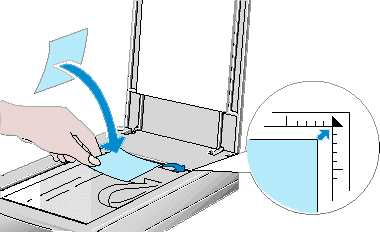
Photo (reflective material)
Place the photo on the document table, with the side to be scanned facing down and aligned with the upper right -hand corner.
 |
Note:
|
 | -
If you have installed either the Film Adapter or the Automatic Document Feeder option on your scanner, remove it and replace the document cover to scan and print using EPSON Instant Photo Print. Otherwise the full document table area may be scanned.
|
| -
An area approximately 3mm in from both horizontal and vertical edges of the document table glass cannot be scanned.
|
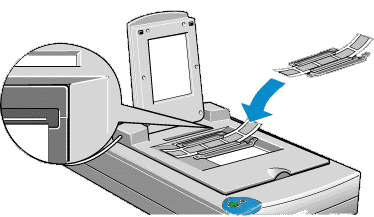
35 mm strip film
Set the film in the film holder designed for use with EPSON Instant Photo Print facing down, and place the film holder on the document table in the window of the Film Adapter.
|
Note:
|
| -
Set the strip film in the film holder so that all of the frame that you want to scan is positioned inside the film holder opening.
|
| -
The front side of film is the side on which the film maker's name and film ID numbers are readable.
|
| -
Place the film holder on the document table, aligned with the upper right hand corner of the film adapter.
|
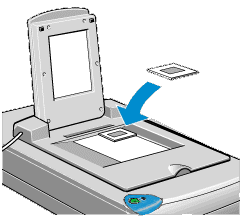
35 mm slides
Place the 35 mm slide holder on the document table, facing down in the window of the Film Adapter.
|
Note:
|
| -
The front side of film is the side on which the film maker's name and film ID numbers are readable.
|
| -
Place the slide on the document table aligned with the upper right hand corner of the film adapter.
|

[Top]
Loading paper in your EPSON printer
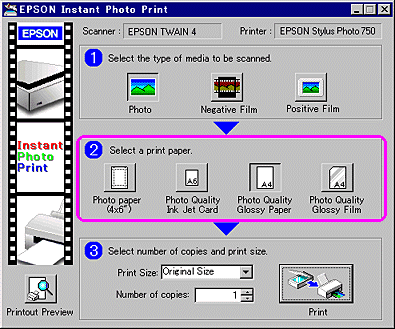
Load paper in your printer. You can use the media types and sizes shown in the EPSON Instant Photo Print window.
|
Note:
|
|
The types and sizes of paper that can be used with EPSON Instant Photo Print may vary depending on the country or the version of the software.
|
[Top]

