 LCD PanelButtons
Product Information / Parts and Control Panel Functions
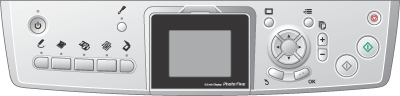
Displays a preview of the selected images, items or settings which can be changed with the buttons and error messages. For details about error messages, see Error messages.
|
|
Buttons |
Function |
 |
On |
Turns this product on and off. When this product is turns on, the On light remains lit, indicating that this product has completed its initialization. |
 |
Setup |
Enters the Setup Mode. |
 |
Creative Projects |
Copies in Copy Photo or print a photos using a Combo Printing Sheet. |
 |
Memory Card |
Enters the Memory Card Print Mode. |
 |
Film |
Enters the Film Print Mode. |
 |
Copy |
Enters the Copy Mode. |
 |
Scan |
Enters the Scan Mode. |
 |
Screen View |
Changes the view of the photos in the memory card. |
 |
Options |
Displays detailed settings for each mode. |
 |
Back |
Cancels the operation on the LCD panel and returns to the previous menu. |
 |
Copies |
Sets the number of copies or prints. |
 |
B&W |
Copies or prints in grayscale. |
 |
Color |
Copies, prints, or scans in color. |
 |
Stop |
Stops copying, printing, or scanning. The sheet being copied or printed is ejected. |
 |
4-way Scroll |
Select the menu items. |
|
OK |
Enters the settings you have selected. |
 Previous |
 Next |
