 Start button on the scanner starts EPSON Smart Panel as default. You can assign a desired application to the Start button in the EPSON Smart Panel window. For details, see Assigning an Application in the EPSON Smart Panel Window.
Scanning by Using the Buttons
Pressing the Start button on the scanner starts EPSON Smart Panel as default. You can assign a desired application to the Start button in the EPSON Smart Panel window. For details, see Assigning an Application in the EPSON Smart Panel Window.
 |
Press the Start button on your scanner. The EPSON Smart Panel window appears.
|
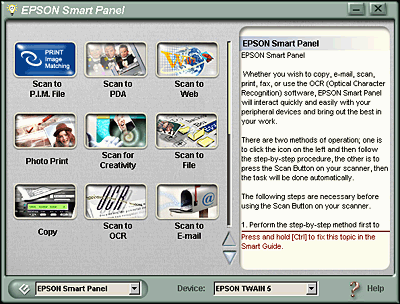
 | Click an application icon. For details, refer to the EPSON Smart Panel documentation. |
 Previous |
 Next |
