 PapierspecificatiesAfdrukgebied
Productinformatie / Printerspecificaties
 | Opmerking: |
 | Aangezien de kwaliteit van een bepaald merk of type papier op elk moment kan worden gewijzigd door de fabrikant, kan EPSON niet instaan voor de kwaliteit van papier dat niet door EPSON zelf wordt geleverd. Probeer papier altijd eerst uit voordat u hiervan grote hoeveelheden aanschaft of hierop grote taken afdrukt. |
Losse vellen:
Formaat |
Super A3/B (329 mm x 483 mm) |
Papiersoorten |
Gewoon papier, speciaal afdrukmateriaal van EPSON |
Dikte |
0,08 mm tot 0,11 mm (0,003 tot 0,004 inch) |
Gewicht |
64 g/m2 (17 lb) tot 90 g/m2 (24 lb) |
Enveloppen:
Formaat |
No. 10 (104,8 mm x 241,3 mm) |
Papiersoorten |
Gewoon papier, luchtpost |
Dikte |
0,16 mm tot 0,52 mm (0,006 tot 0,02 inch) |
Gewicht |
45 g/m2 (12 lb) tot 75 g/m2 (20 lb) |
Indexkaart:
Formaat |
Letter (105 mm x 148 mm) |
Papiersoorten |
Speciaal afdrukmateriaal van EPSON |
EPSON Premium Ink Jet Plain Paper:
Formaat |
A4 (210 mm x 297 mm) |
Papiersoorten |
Speciaal afdrukmateriaal van EPSON |
Bright White Ink Jet Paper:
Formaat |
A4 (210 mm x 297 mm) |
Papiersoorten |
Speciaal afdrukmateriaal van EPSON |
Premium Semigloss Photo Paper:
Formaat |
Super A3/B (329 mm x 483 mm) |
Papiersoorten |
Speciaal afdrukmateriaal van EPSON |
Archival Matte Paper:
Formaat |
Super A3/B (329 mm x 483 mm) A3 (297 mm x 420 mm)
Letter (216 mm x 279 mm) |
Papiersoorten |
Speciaal afdrukmateriaal van EPSON |
Watercolor Paper - Radiant White:
Formaat |
Super A3/B (329 mm x 483 mm) |
Papiersoorten |
Speciaal afdrukmateriaal van EPSON |
Glossy Paper-Photo Weight:
Formaat |
Super A3/B (329 mm x 483 mm) |
Papiersoorten |
Speciaal afdrukmateriaal van EPSON |
Premium Luster Photo Paper:
Formaat |
Super A3/B (329 mm x 483 mm) A3 (297 mm x 420 mm) Letter (216 mm x 279 mm) 329 mm x 10 m 210 mm x 10 m |
Papiersoorten |
Speciaal afdrukmateriaal van EPSON |
Velvet Fine Art Paper:
Formaat |
Super A3/B (329 mm x 483 mm) Letter (216 mm x 279 mm) |
Papiersoorten |
Speciaal afdrukmateriaal van EPSON |
Premium Gloss Photo Paper:
Formaat |
Super A3/B (329 mm x 483 mm) |
CD-R:
Formaat |
12 cm |
| Opmerking: |
|
|
|
|
|
|
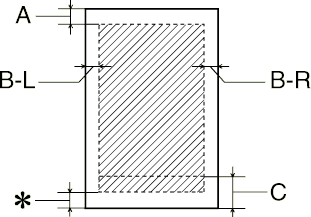
Losse vellen (inclusief panoramisch formaat)
|
Normaal |
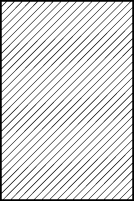
Geen marges |
 |
 |
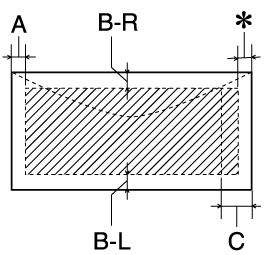
Enveloppen
|
A: |
De bovenmarge is minimaal 3,0 mm (0,12"). |
|
B-L: |
De linkermarge is minimaal 3,0 mm (0,12"). |
|
B-R: |
De rechtermarge is minimaal 3,0 mm (0,12"). |
|
C: |
De instelling voor de ondermarge is minimaal 14,0 mm (0,55"). Wanneer wordt afgedrukt in de buurt van de minimale ondermarge, worden sommige kleuren niet altijd goed afgedrukt. Vergroot in dat geval de ondermarge. |
|
|
U kunt de minimale ondermarge verkleinen tot 3 mm door Maximum te selecteren bij Afdrukgebied op het tabblad Papier van de printersoftware (Windows) of in het dialoogvenster voor de pagina-instelling (Macintosh). De afdrukkwaliteit in het uitgebreide gebied kan echter slechter zijn. Druk als u deze instelling gebruikt altijd eerst één pagina af om de afdrukkwaliteit te controleren voordat u grote taken afdrukt. |
|
|
Wanneer u afdrukt met de instelling Geen marges, kan de afdrukkwaliteit aan de boven- en onderkant van het papier minder zijn of vegen vertonen. |
| | Opmerking: |
| | Laad papier altijd met de smalle kant eerst in de papiertoevoer. Laad enveloppen altijd met de flap eerst en met de flap aan de onderzijde. |
 Vorige |
 Volgende |

