 Easy menuAdvanced menu
Scanning Basics
EPSON TWAIN offers two different levels of menus to enhance or simplify the number of options you can control.
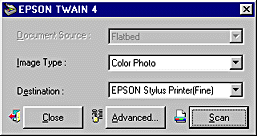
In the Easy menu, only the minimum necessary options are displayed. If you want to scan quickly and easily without changing any complex settings, select the Easy menu. To have more control over your scanning settings, click the Advanced button to open the Advanced menu.

In the Advanced menu, there are many more options available to give you greater control over your scanning. If you want to re-size, scale, sharpen, correct, enhance or preview your images before scanning them, select the Advanced menu. If you don't need all the options that the Advanced menu provides, click the Easy button to open the Easy menu.
 Next |
