  |
Knowledge
Base FAQ's & Technical Guides |
To reinstall the printer driver start by dragging the EPSON folder into the trash. The EPSON folder is located in the following location: Macintosh HD, System Folder and then Extensions. Empty the trash. Insert the EPSON Printer Software CD-ROM and follow the onscreen instructions. For help with installing and configuring the driver please click the link:
How do I install a USB EPSON printer on MAC OS Classic?
If you are experiencing problems or have the following error message (Displayed below) please follow the instructions below.

Start by double clicking the Macintosh HD icon on your desktop.
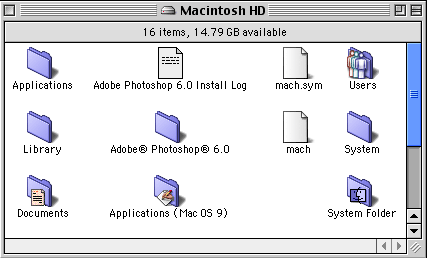
Double click System Folder.
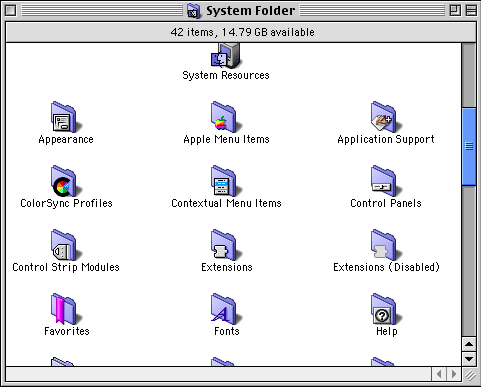
Now Double click the Extensions folder.
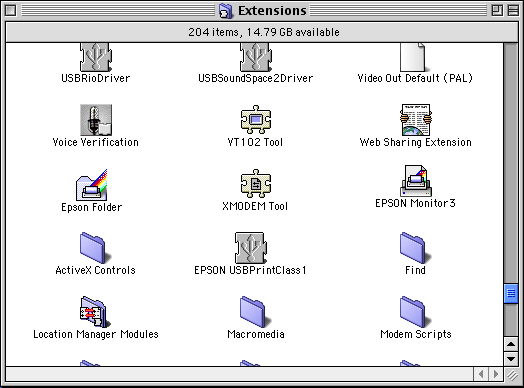
Drag EPSON Folder into the trash and empty the trash.
You now need to reinstall the driver. Insert the EPSON Printer Software CD-ROM and follow the onscreen instructions. For help with installing and configuring the driver please click the link:
How do I install a USB EPSON printer on MAC OS Classic?
Article: KB020115 Language: English Product Range: Ink Jet
