  |
Knowledge
Base FAQ's & Technical Guides |
How do I use WinZip?
You can download the evaluation version from www.winzip.com.
After installation of WinZip you can now zip / unzip files. Double click
on the downloaded zip file extract the files into the desired directory.
Instructions
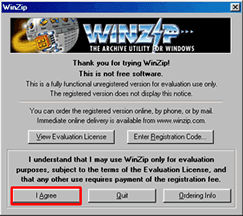
When you download files from the Internet they are usually compressed to decrease download time. When you have successfully downloaded the required files you will need to unzip them with WinZip. If you do not have WinZip installed you can download the evaluation version free from www.winzip.com. Firstly create a new folder by right clicking on your desktop and selecting New and then Folder. Give the folder a recognisable name. Double-click on the icon for your downloaded file. Click I Agree.
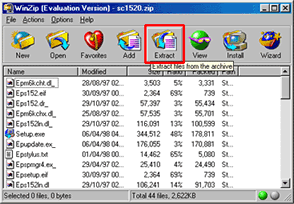
Click Extract to unzip the files.
Double-click on your new folder and click Extract.
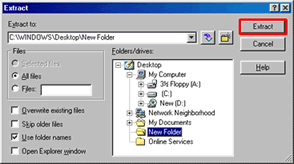
This will now unzip the files to your folder ready for installation.
Article: KB020025 Language: English Product Range: All
