  |
Knowledge
Base FAQ's & Technical Guides |
How do I install the EPSON Perfection 1200
Photo, 1200S, 1200U, 1240U, 1640SU, 610 and 640U on Windows 95, 98 or
Me?
Connect the scanner to the PC, and then turn the power on. The Found New
Hardware Wizard will now appear. Follow the on-screen instructions, selecting
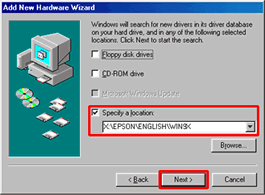
Specify a location and enter the following path X:\EPSON\ENGLISH\WIN9X
(where X is your CD-ROM drive letter). Now run the CD-ROM and install
EPSON Smart Panel. When completed please restart your computer.
Instructions
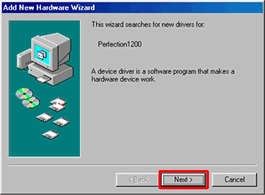
Connect USB cable between computer and scanner and then switch the scanner on. The Found New Hardware Wizard will appear on screen. Click Next.
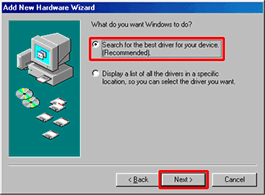
Click Search for the best driver and click Next.
Tick Specify a location and type in X:\EPSON\ENGLISH\WIN9X (where X is the letter of your CD-ROM drive) and click Next.
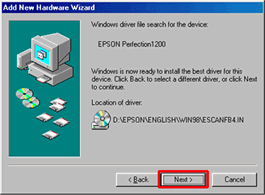
Windows will find the scanner driver files, click Next.
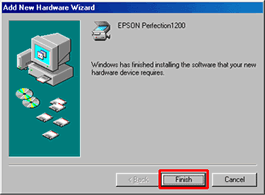
The driver installation is now complete, click Finish.
Article: KB020023 Language: English Product Range: Scanner
