  |
Knowledge
Base FAQ's & Technical Guides |
How to select different languages, change the paper length and switch the line feed on / off on DFX 8500 dot matrix printer?
To set these settings you have to change DIP switches.
DIP switch 1
Switch Description ON OFF
1-1 Character table See Tables-A1 and Table A-2
1-2
1-3
1-4
1-5
1-6
1-7 Skip over perforation Active Inactive
1-8 Print direction Uni-d Bi-d
DIP switch 2
Switch Description ON OFF
2-1 Page length for front tractor see Table B
2-2
2-3
2-4
2-5 Page length for rear tractor See Table C
2-6
2-7
2-8
DIP Switch 3
Switch Description ON OFF
3-1 Auto tear off Active Inactive
3-2 Zero slash Active Inactive
3-3 Auto line feed Active Inactive
3-4 Buzzer (beep) Inactive Active
3-5 Auto CR Active Inactive
3-6 IBM character table Table 1 Table 2
3-7 Auto cut mode Active Inactive
3-8 Software IBM 2381 Plus ESC/P
DIP switches for front tractor
Page length for front tractor
SW 2-1 SW 2-2 SW 2-3 SW 2-4
11 inches OFF OFF OFF OFF
4 inches OFF OFF ON ON
5.5 inches OFF ON OFF OFF
6 inches OFF ON OFF ON
7 inches OFF ON ON OFF
8 inches OFF ON ON ON
8.5 inches ON OFF OFF OFF
70/6 inches ON OFF OFF ON
12 inches ON OFF ON OFF
14 inches ON OFF ON ON
17 inches ON ON OFF OFF
DIP switches for rear tractor
Page length for rear tractor
SW 2-5 SW 2-6 SW 2-7 SW 2-8
11 inches OFF OFF OFF OFF
4 inches OFF OFF ON ON
5.5 inches OFF ON OFF OFF
6 inches OFF ON OFF ON
7 inches OFF ON ON OFF
8 inches OFF ON ON ON
8.5 inches ON OFF OFF OFF
70/6 inches ON OFF OFF ON
12 inches ON OFF ON OFF
14 inches ON OFF ON ON
17 inches ON ON OFF OFF
What is the exact set-up for the DIP switches?
1. Turn off the printer
2. Open the printer’s front cover by lifting the middle of its
bottom edge up until it locks in place.
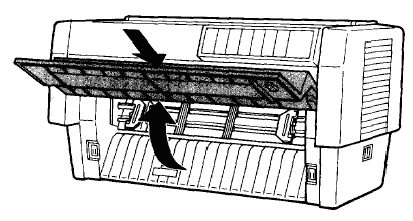
3. The DIP switches are located in
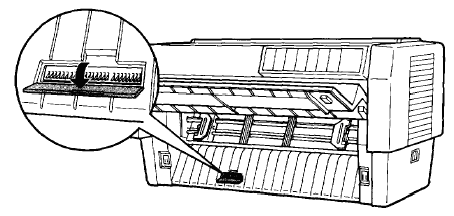
a small compartment on the front paper guide, behind the front tractor
paper. If paper is loaded on the front tractor, either remove it or
lift it up out of the way so you can reach the DIP switches.
4. Open the DIP switch cover
5. Use a pointed instrument, such as the tip of a ballpoint pen, to turn the switch either on or off. A DIP switch is on when it is up, and off when it is down.
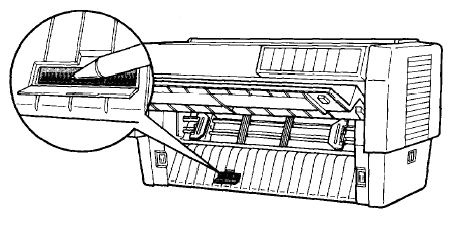
6. Close the DIP-switch cover and
replace the paper
7. Next, close the front cover
8. Turn on the printer to initialise the new settings. When you change
a DIP-switch setting, the new settings take effect only after you turn
on or reset the printer.
Article: KB020070 Language: English Product Range: Dot Matrix
