 |
|
Windows |
 |
|
Macintosh |
Understanding EPSON TWAIN Features
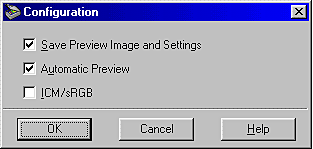
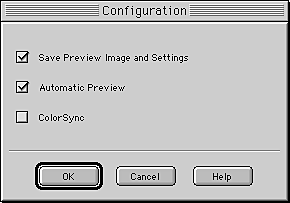
You can adjust the Preview window by changing the configuration. Click the Configuration button on the Manual mode window to display the following dialog box and make changes.
|
|
|
Windows |
|
|
|
Macintosh |
Select this check box to automatically save the preview image and its image settings when you exit EPSON TWAIN (and quit scanning). The image and its settings are available the next time you restart EPSON TWAIN.
Select this check box to enable automatic preview when EPSON TWAIN starts.
Select this check box to reproduce an image is colors using the Windows ICM color management system. This setting is available only on Windows system.
 | Note: |
 |
|
|
|
|
|
Select this check box to reproduce an image is colors using the ColorSync color management system. This setting is available only on Macintosh system.
| Note: |
|
|
|
|
|
|
 Previous |
 Next |
