Understanding EPSON TWAIN Features
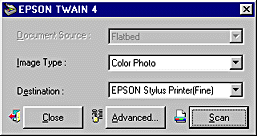
The Easy menu displays the minimum required settings only, allowing you to scan easily and quickly. Just select the relevant Document Source, Image Type, and Destination settings, then click Scan.
EPSON TWAIN automatically locates the target image on the scanner, adjusts the exposure, and starts scanning. See Document Source, Image Type, and Destination for details.
 | Note: |
 |
|
|
|
|
|
If you want to make more settings, click Advanced to open the Advanced menu.
 Previous |
 Next |
