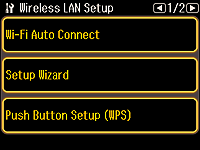
Select
Setup Wizard.
Click
Next to continue.
If a different screen is displayed, follow the instructions below to display the screen above.
1. Press

to display the Home screen.
2. Select
Setup.
3. Use

or

to select
Network Settings.
4. Select
Wireless LAN Setup.