  |
Knowledge
Base FAQ's & Technical Guides |
Before you transport the scanner or store it
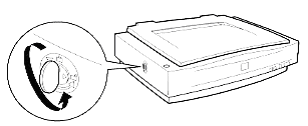
for a long period of time, secure the carriage by turning the transportation
lock back to the locked position.
To unlock the scanner turn the transportation lock to the unlocked position
using a coin or a similar object, as shown below.
Article: KB020104 Language: English Product Range: Scanner

©
EPSON