  |
Knowledge
Base FAQ's & Technical Guides |
What should I do when I get the message:
"Please insert the disk labelled Windows 98 Second Edition CD-ROM,
and then click OK"?
When you get this message please insert the Windows 98 Second Edition
CD-ROM and browse to the WIN98 directory. Then click ok and this will
copy the files. If the screen calibration appears please follow the instructions
and click ok.
Instructions
Windows does not install support for scanners by default. Therefore it is common for Windows to request the CD-ROM when it needs system files that have not been previously installed. Windows will display this screen. Insert the Windows CD-ROM and click OK.
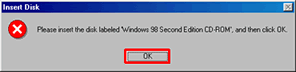
Windows will now copy the files required. If any messages appear stating that certain files cannot be found change the source directory to X:\WIN98 (Where X represents your CD-ROM drive).
Article: KB020034 Language: English Product Range: Scanner/Multifunction
